Overview
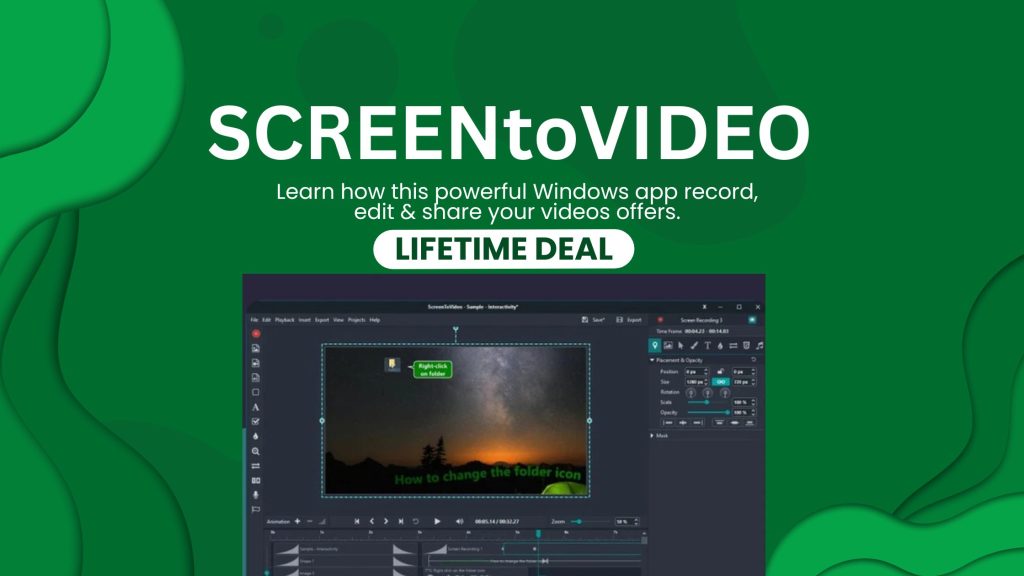
ScreenToVideo is a Windows-based software tool that combines screen recording and video editing into one package. It’s designed for creators, educators, trainers and small businesses who need to produce polished video content without a steep learning curve. Sources report users paying a one-time fee via the lifetime deal on AppSumo for full access.
It enables you to capture your screen, webcam, system audio, and includes built-in editing tools to trim, annotate, blur, export and share your videos.
Grab ScreenToVideo AppSumo
What Is ScreenToVideo?
ScreenToVideo is essentially an all-in-one tool for:
-
Recording your screen (full screen, specific window, region).
-
Capturing webcam overlay and system or microphone audio.
-
Editing the captured footage inside the same app—cutting out mistakes, applying blur, adding cursor effects, annotations, transitions, and export options.
The lifetime deal makes it accessible as a one-time purchase instead of a recurring subscription.
Best For
ScreenToVideo is ideal for:
-
Content creators producing tutorial videos, YouTube demonstrations.
-
Educators or trainers who need to record lessons, software walkthroughs, or online course content.
-
Small business teams creating product demos, training videos, internal documentation.
-
YouTubers, course creators, or anyone needing to record and edit screen content on a Windows machine with minimal fuss.
Alternatives
If you’re comparing ScreenToVideo with other options, some alternatives include:
-
Camtasia – Full-featured, professional screen-recording + editing suite, but far more expensive.
-
Loom – Simpler, browser-based or desktop tool for screen recording and sharing, but weaker in editing functionality and usually subscription-based.
-
OBS Studio – Free, open-source, extremely powerful for recording/streaming but steep learning curve and no built-in editing by default.
-
ScreenPal (formerly Screencast-O-Matic) – Another easier option for screen recording + editing, but still subscription-based and fewer advanced AI features.
Key Features
Here are the standout features of ScreenToVideo:
-
Screen recording of full screen, window, region + webcam overlay and audio capture.
-
Built-in video editor: timeline, trimming, splitting, transitions.
-
AI-powered tools (e.g., AI silence removal, auto-blurring of sensitive info) to speed up editing.
-
Annotation and drawing tools: highlight areas, draw arrows, emphasise clicks during recording.
-
Export options to MP4, GIF, audio-only extraction and direct share options (e.g., Google Drive) in some reviews.
-
One-time purchase lifetime licence (via AppSumo) with free updates.
ScreenToVideo vs Notion
While comparing ScreenToVideo and Notion may seem unusual because they serve very different purposes, here’s how they stack up:
| Feature | ScreenToVideo | Notion |
|---|---|---|
| Screen recording | Yes — primary function | No |
| Video editing | Yes | Not built for video editing |
| Workspace / docs / tasks | Focus is on video creation | Excellent for notes, docs, databases, tasks |
| Best use | Video tutorials, demos, screen captures | Documentation, project management, knowledge base |
| Lifetime deal option | Available via AppSumo | Not typically lifetime deal in same context |
Conclusion:
If your main goal is creating video content – recording your screen, editing tutorials/demos – ScreenToVideo is the clear choice. If your priority is building a workspace for documentation, project tracking, and collaboration, Notion is a better fit. You could use both in combination (record/edit video with ScreenToVideo + embed/share in Notion).
Use Cases
Here are realistic scenarios where ScreenToVideo works very well:
-
A YouTube tutorial creator records software walkthroughs, uses the AI silence-removal to polish the video fast, exports and uploads.
-
A course creator records lecture slides + webcam, edits using annotations, exports for a course platform.
-
A small business making product demo videos or internal training videos for staff.
-
A support team creating quick “how-to” videos for customers (screen recordings of solving common issues).
-
A software company producing onboarding videos or release highlights, capturing UI, adding arrows/calls, exporting for website/video hosting.
Pros and Cons
Pros
-
Very good value for money via lifetime deal.
-
Combines screen recorder + editor in one tool (no need separate apps).
-
AI features (silence removal, blur) save time and improve final output.
-
Beginner-friendly interface – easier than complex professional tools.
-
Lifetime updates promised in some licensing.
Cons
-
Works only on Windows (no Mac version currently).
-
Editor is strong but may lack ultra-advanced effects or multi-track depth found in top video-editing suites.
-
Output/export and integrations might be less robust compared to premium video platforms.
-
For Mac or cross-platform users, this tool may not fit.
-
Lifetime deal may come with license/user restrictions – always check deal terms.
AppSumo Deal Features
Here’s what the AppSumo lifetime deal for ScreenToVideo typically includes:
-
One-time payment (e.g., around $59 as reported) for lifetime access.
-
Full featured recorder + editor, including AI-powered editing tools.
-
Free lifetime updates and support (according to licence) for that one payment.
-
Windows only compatibility listed.
-
Export video, GIFs, audio extraction.
-
Money-back guarantee period (often 60 days as per reviews).
Summary
If you’re a Windows user who creates screen-based videos—whether it’s tutorials, product demos, training content, or YouTube videos—ScreenToVideo offers a compelling package. It strikes a balance between ease of use and feature set, especially with its built-in editor and AI tools. The lifetime deal makes it financially attractive compared to subscription-based tools.
However, if you’re on Mac, need ultra-high-end video editing features, or your output demands cinematic post-production, you may need to complement or choose a different tool. For most creators and educators, though, ScreenToVideo represents a smart investment.
Discover More AppSumo Deal Review- Click Here