Overview
Giving feedback on digital products — like websites, apps, videos, PDFs, and images — shouldn’t feel like a scavenger hunt through screenshots, chats, and emails.
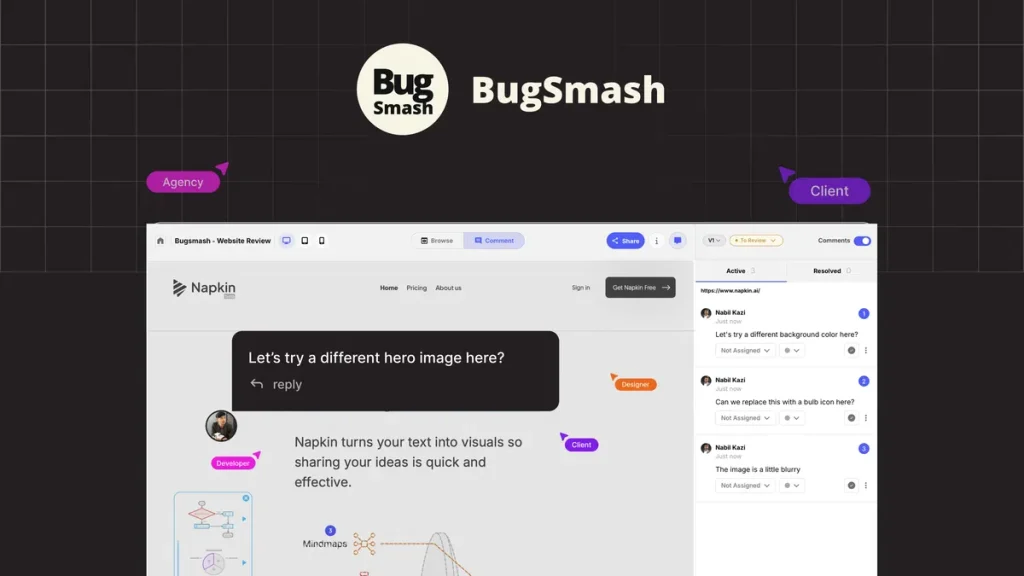
BugSmash solves this by creating a central visual feedback hub where teams and clients can annotate directly on live content with comments, highlights, and threaded replies — no scattered communication, no confusion.
It’s especially useful for designers, product teams, developers, and agencies that want to dramatically speed up review cycles and reduce the back-and-forth in revisions.
What Is BugSmash?
BugSmash is a visual feedback and review tool that lets teams capture, annotate, and manage review comments on a wide range of digital content — including:
-
live websites
-
videos
-
images
-
PDFs
-
audio files
-
mobile apps
Reviewers can highlight issues directly on the content, add contextual comments, and share feedback via no-login guest links, making it easier to gather input from clients and stakeholders without forcing them to create accounts.  Grab BugSmash on AppSumo
Best For
BugSmash is ideal for:
✔ Product teams who need clear bug reports and visual annotations
✔ Designers refining UI/UX with contextual feedback
✔ Developers & QA teams consolidating issues into tasks
✔ Agencies collecting client feedback without chaos
✔ Marketing teams reviewing creatives and landing pages
✔ Freelancers & clients seeking structured visual review workflows
Visit Our Officail Website>Affiliatalk
Key Features
🎯 Visual Annotations
Highlight UI elements, text, or design issues directly on any asset.
💬 Threaded Comments
Keep discussions organized with replies tied to specific feedback points.
📁 Multi-Format Support
Review live websites, PDFs, images, videos, audio, and mobile interfaces all in one place.
🔗 No-Login Guest Commenting
Share feedback links that allow clients and stakeholders to comment without creating accounts.
📊 Version Control
Track changes and compare different feedback iterations to stay organized.
🤖 AI Review Option (Beta)
Get automated UI/UX suggestions and spot potential accessibility or layout issues fast.
🔄 Integrations
Sync with Jira, Slack, Webhooks, and other workflow tools to turn feedback into actionable tasks.
Use Cases
• Design reviews — gather contextual feedback on live designs
• Website QA — annotate bugs on staging or live sites
• Creative approvals — share and collect comments on videos and marketing assets
• Client feedback — no login required — just share a link
• Dev handoff — precisely capture issues for developers
• Cross-team collaboration — keep design, product, and content teams aligned
BugSmash vs Notion
| Feature | BugSmash | Notion |
|---|---|---|
| Visual Feedback | ✅ Yes | ❌ No |
| Annotated Comments | ✅ Yes | ⚠️ Limited |
| Live Content Review | ✅ Yes | ❌ No |
| Client Guest Feedback | ✅ Yes | ❌ No |
| Knowledge Base | ❌ | ✅ Yes |
| Docs & Notes | ⚠️ | ✅ Yes |
Winner (Feedback & Collaboration): BugSmash
Winner (Documentation & Planning): Notion
👉 Use Notion for internal docs and BugSmash for external visual reviews.
Pros and Cons
✅ Pros
✔ All visual feedback centralized in one place
✔ Works on multiple formats (web, PDF, video, image, audio)
✔ No-login guest commenting — great for clients
✔ Integrates with Jira, Slack & other tools
✔ AI review option speeds up early checks
❌ Cons
✖ Advanced features (like AI review & integrations) may be tier-locked
✖ Not designed for code execution or project planning
✖ Steeper learning curve for non-technical clients
Alternatives
| Tool | Best For |
|---|---|
| Markup | Enterprise visual review (premium) |
| Filestage | Creative review workflows |
| Frame.io | Video feedback & approval |
| InVision Stakeholders | Design collaboration |
| Notion | Documentation & note planning |
AppSumo Deal Features
The AppSumo lifetime deal for BugSmash typically includes:
✔ Lifetime access with a one-time payment
✔ Multiple projects with file storage limits
✔ Guest reviewers unlimited
✔ Custom branding & notifications
✔ Integrations (Slack, Jira, Webhooks)
✔ AI review credits (tier-based)
🔥 A strong alternative to expensive visual review tools with recurring fees. Visit Our Officail Website>Affiliatalk
Summary
BugSmash is a powerful visual feedback and review platform that helps teams, agencies, and creators streamline feedback loops on virtually any digital content — all in one place. By replacing scattered screenshots, messy email threads, and disjointed review comments with a centralized annotated workflow, BugSmash speeds up iterations and reduces revision chaos.
If your team struggles with feedback loops and stakeholder reviews, BugSmash is worth testing — especially with the AppSumo lifetime deal for long-term cost savings.
FAQ (People Also Ask – CTR Boost)
❓ What is BugSmash used for?
BugSmash is used to gather and manage visual feedback and annotations on websites, apps, videos, images, PDFs and audio files — helping teams communicate issues clearly.
❓ Can clients leave comments without signing up?
Yes — BugSmash supports no-login guest commenting so clients or stakeholders can leave feedback using just a shared link.
❓ Does BugSmash work with Jira and Slack?
Yes — it integrates with Jira and Slack to turn feedback into actionable tasks and notify teams on updates.